Master’s thesis · M.Sc. Interdisciplinary Media Studies (focus: Human–Computer Interaction) · Bielefeld University · 2015 · Thesis grade: 1.0
For my master’s thesis, I explored how video-call interfaces could support more independent communication for people with cognitive disabilities. Working with the Social Cognitive Systems research group at Bielefeld University and the PIKSL laboratory in Düsseldorf, I developed and evaluated “Freundeskreis”. It’s a prototype built around a circle of friends, with optional assistance from the virtual agent Billie.

I wanted to turn the principles of universal design into something tangible: an interface shaped by the people who would use it. Their experiences informed the first ideas, exposed weaknesses in the prototype and guided its refinement.
I defended the thesis in 2015 and returned to the work for republication in 2025, as the accessibility requirements of Germany’s Barrierefreiheitsstärkungsgesetz (BFSG) began applying to covered products and services on 28 June. That gave me a reason to revisit the original question. The evaluations described below belong to the earlier research, rather than to a new study in 2025.
In my earlier article, Designing Inclusive Interfaces: A Guide for Accessibility, I discussed how to understand people’s abilities and the demands an interface places on them. Here, I want to follow that question through the design process, from the first conversations to the prototype and the difficulties that remained.
The aim was to support everyday communication without creating another isolated solution. Friends and relatives should be able to use the same interface. Skype, which was widely used when I carried out the research in 2014, provided a starting point for understanding where familiar communication software could still create barriers. It is a historical comparison: consumer Skype retired in May 2025.
Understanding everyday communication
I combined conversations, observation and usability testing to understand the context of use. Each offered a different perspective. What people said they wanted from a communication tool mattered, but so did what happened when they tried to use one.

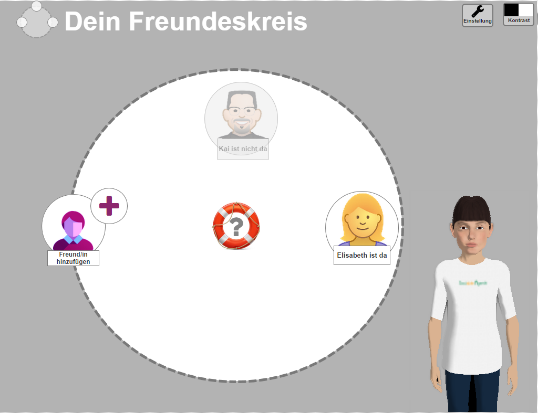
The prototype shown here brings together two ideas that emerged through this process: a “circle of friends” as the central way of finding contacts, and a virtual assistant that could offer help when needed.
Learning from participants

I began with a focus group to learn how participants used computers and kept in touch with friends and family. We discussed their experiences with video calls, the functions they wanted and the situations in which they needed help. Sketching offered another way to express ideas. The “circle of friends” metaphor grew out of this exploration of familiar relationships and ways of thinking about communication.
Where Skype created barriers

In the Skype usability test, participants worked through five everyday tasks while thinking aloud: [A] logging in, [B] writing a message, [C] making a video call, [D] adjusting the volume and [E] adding a contact. I recorded task completion, time, clicks, errors and assistance, alongside responses to the System Usability Scale and Single Ease Question. A pre-test and debriefing helped put these observations in context.
Participants described different difficulties with reading, writing, concentration and understanding information. I used the abilities–limitations framework by Jokisuu, Langdon and Clarkson to relate these observations to interface demands, as explained in the earlier article. The purpose was to understand where the design needed to provide support, rather than assume that one solution would suit everyone.
The conversations also made me look more closely at what assistance should mean. One participant described being able to manage alone once someone had shown them how. Another preferred hearing and speaking because visual information was harder to take in. Help therefore needed to offer another way into the interface while leaving the person in control.
The usability test made some of the barriers very concrete. A participant entered a message in the search field instead of the message area. Others struggled to find the audio settings or tried ambiguous symbols while looking for the right function. These observations suggested problems with visibility, feedback and the organisation of actions. Writing a message, adjusting the volume and adding a contact were particularly difficult to complete independently.
Together, these findings informed the requirements for “Freundeskreis”, or “circle of friends”. The challenge was to make everyday actions easier to recognise and to provide help at the point where someone needed it.
From a circle of friends to an interface


I first explored the concept through static wireframes in Balsamiq, then developed an interactive prototype in Axure RP. The design brought together usability principles, accessibility guidance and the findings from the participant sessions. Contacts were arranged around a circle, with visible options for writing a message or starting a call. Symbols and colour cues supported recognition, while clearer instructions and sensible defaults aimed to reduce uncertainty.
The assistance concept used the embodied conversational agent Billie to explain parts of the interface through speech and visual highlighting. The intention was to help people understand what they could do next and build a clearer mental model of the application. Users could activate or deactivate the assistant on demand. Keeping control over help was part of the design itself.
The gallery shows this progression: a static wireframe of the circle-of-friends concept, an interactive screen with message and call options, and an assistance situation in which Billie explains the interface while relevant objects are highlighted.
What the prototype made easier — and what it did not

I evaluated the interactive prototype with three participants who had also taken part in the earlier Skype study. The sessions followed a broadly similar procedure, but were not identical: the prototype evaluation focused on four tasks, B–E, and included a pre-test on recognising symbols. This allowed an exploratory comparison of the two interfaces.
The results were encouraging. In the reported comparison, the proportion of tasks completed without assistance rose from 50% to 67% for writing a message, from 75% to 100% for calling a contact, and from 50% to 100% for adjusting the volume. Adding a friend remained difficult: independent completion rose from 25% to 33%. With only three prototype participants, each person accounted for roughly a third of the result.
These figures need to be read alongside the observations. The samples were small, participants had encountered the earlier tasks, and a prototype differs from a fully functioning product. The results therefore provide indications for further design work, rather than proof of a general improvement. Participants responded positively to the circle-of-friends idea, but Billie’s help was used only sparingly. The study does not establish how much of the overall result can be attributed to the assistant.
The remaining problems mattered just as much. Adding contacts still required substantial assistance for some participants. The evaluation informed further changes to the contact-adding mechanism, colour coding and the assistant’s explanations. The outcome was a revised prototype and a starting point for implementation.
Returning to the work
Returning to this work in 2025, what stayed with me was the relationship between independence and support. Making an interface easier to use involves more than reducing the number of buttons. People need to recognise what an action will do, understand the feedback they receive and decide when they want help.
For me, the contribution of the project lies in working through those questions with people with cognitive disabilities. Their observations shaped the metaphor, exposed weaknesses in the design and guided the next iteration. The prototype remained unfinished, but the process showed how much becomes visible when the people who encounter barriers are involved in designing a way through them.
The process on one poster
The original research poster brings the process together: understanding needs and barriers, developing the circle-of-friends prototype, evaluating it with participants and refining the design. It is in German and remains a historical snapshot of the project. The SUS figures on the poster are scores out of 100, despite the percentage notation; the implementation step indicates the direction of further work, rather than evidence of a deployed service.

Open the original research poster as a PDF (German, 1.6 MB).
References
This article draws on my Master’s thesis and the subsequent work with Kirsten Bergmann cited below. An earlier version appeared on usabilityblog.de. I returned to the material for republication in 2025; the research findings reported here come from the original project.
- Bundeskompetenzzentrum Barrierefreiheit e. V. (BKB) (2011) Barrierefreiheit für Menschen mit kognitiven Einschränkungen: Kriterienkatalog. BKB. (PDF; archived copy.)
- Dix A, Finlay J, Abowd GD and Beale R (2007). Human–Computer Interaction. 3rd ed. Pearson/Prentice Hall. (Companion website.)
- Norman DA (2014; originally published 1983). Some Observations on Mental Models. In: Gentner D and Stevens AL (eds), Mental Models. Psychology Press, pp. 7–14. Publisher preview (PDF).
- Jokisuu E, Langdon PM and Clarkson PJ (2012). A Framework for Studying Cognitive Impairment to Inform Inclusive Design. In: Langdon P, Clarkson J, Robinson P, Lazar J and Heylighen A (eds) Designing Inclusive Systems: Designing Inclusion for Real-world Applications. London: Springer London, pp. 115–124. (Publisher page; full text may require access.)
- Pagel P (2015). Eine Videotelefonie-Schnittstelle für Menschen mit kognitiven Einschränkungen — Analyse, Konzept, Prototyp und Evaluation nach nutzerzentrierten Faktoren. Master’s thesis, M.Sc. Interdisciplinary Media Studies, Bielefeld University. Research conducted in 2014.
- Pagel P & Bergmann K (2016). Eine Videotelefonie-Schnittstelle mit Assistenzsystem für Menschen mit kognitiven Einschränkungen. In: Eyssel F, Kluge A, Kopp S, et al. (Eds.), Proceedings 5. Interdisziplinärer Workshop Kognitive Systeme: Mensch, Teams, Systeme und Automaten. Author-uploaded version: PDF, German, 2 pages.
You must be logged in to post a comment.